

Website maintenance: what it includes, how often, and who should do it
What website maintenance includes, a weekly to yearly schedule, who handles what on Wix, WordPress or a custom site, and when to do it yourself.
Website maintenance is the routine work that keeps a site safe and working after launch. It covers software updates, backups, security and uptime checks, testing your forms, renewing the domain and SSL certificate, and keeping the content accurate. On most small business sites it takes less than an hour a week. Skipping it is how sites get hacked or go offline when a renewal lapses. More often, a contact form stops sending leads and nobody notices for months.
How much work there is depends on how the site is built. A Squarespace site needs far less attention than a self-hosted WordPress site running twenty plugins. This guide covers what the work includes, a schedule you can follow, and how to decide whether to do it yourself.
What does website maintenance include?
- Software updates. The content management system, theme and plugins, plus the server software underneath, such as the PHP or Node version. An outdated plugin with a known security hole is one of the usual ways small business sites get broken into.
- Backups. Automatic copies of the files and the database, kept somewhere other than the server the site runs on. A backup only counts once you've restored it at least once and seen it work.
- Security and uptime monitoring. Something should alert you when the site goes down or its files change unexpectedly. Google Search Console has a Security issues report that tells you if Google has found malware or spam on your pages.
- Forms and checkout. Contact, quote and booking forms break silently. An email setting changes, a spam filter starts catching them, or a plugin update stops them sending, and nobody notices because nobody is getting the messages.
- Renewals. The domain, the hosting plan and the SSL certificate all expire. Under rules adopted by the CA/Browser Forum in 2025, the longest an SSL certificate can be valid dropped to 200 days in March 2026 and falls to 47 days by 2029, so certificates have to renew automatically.
- Speed. Pages get heavier as images, tracking tags and widgets pile up. Check mobile speed against the Core Web Vitals now and then, not only at launch.
- Content. Hours, services, staff, prices and photos change. Expired promotions and old holiday hours make a business look closed.
- Search and analytics. Search Console shows pages Google can't index and links that lead to errors. Confirm analytics still records leads after any change to forms or tracking.
- Privacy and accessibility. The privacy policy should match what the site actually collects, and new content should keep meeting the accessibility basics.
A website maintenance schedule
Weekly
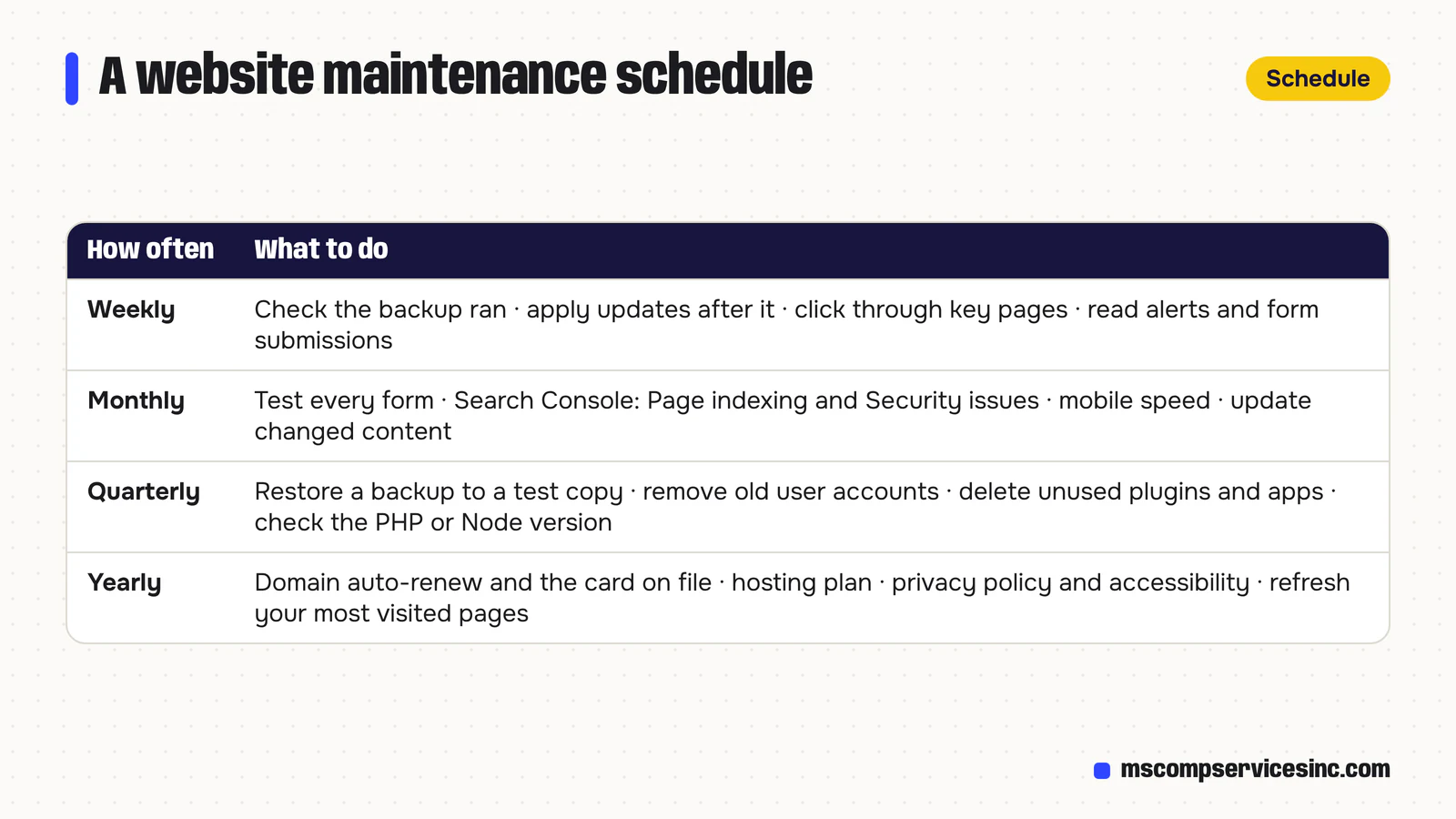
Check that the latest backup ran. On WordPress, apply waiting updates after the backup, then click through the home page, a service page and the contact form. Read any uptime or security alerts and look at the week's form submissions. If they suddenly drop to zero, test the form before assuming it was a quiet week.
Monthly
Send a test through every form and confirm it arrives. Open Search Console and look at the Page indexing and Security issues reports. Run a few key pages through PageSpeed Insights on mobile. Update anything in the content that has changed.
Quarterly
Restore a backup to a test copy of the site to prove it works. Review user accounts on the site and remove anyone who has left. Delete plugins and apps you no longer use, since inactive plugins can still be a way in. Check that the server runs a PHP or Node version that still gets security fixes.
Yearly
Confirm the domain is set to auto-renew with a card that hasn't expired. Review your hosting plan and what it costs. Reread the privacy policy, retest accessibility, and bring your most visited pages up to date.
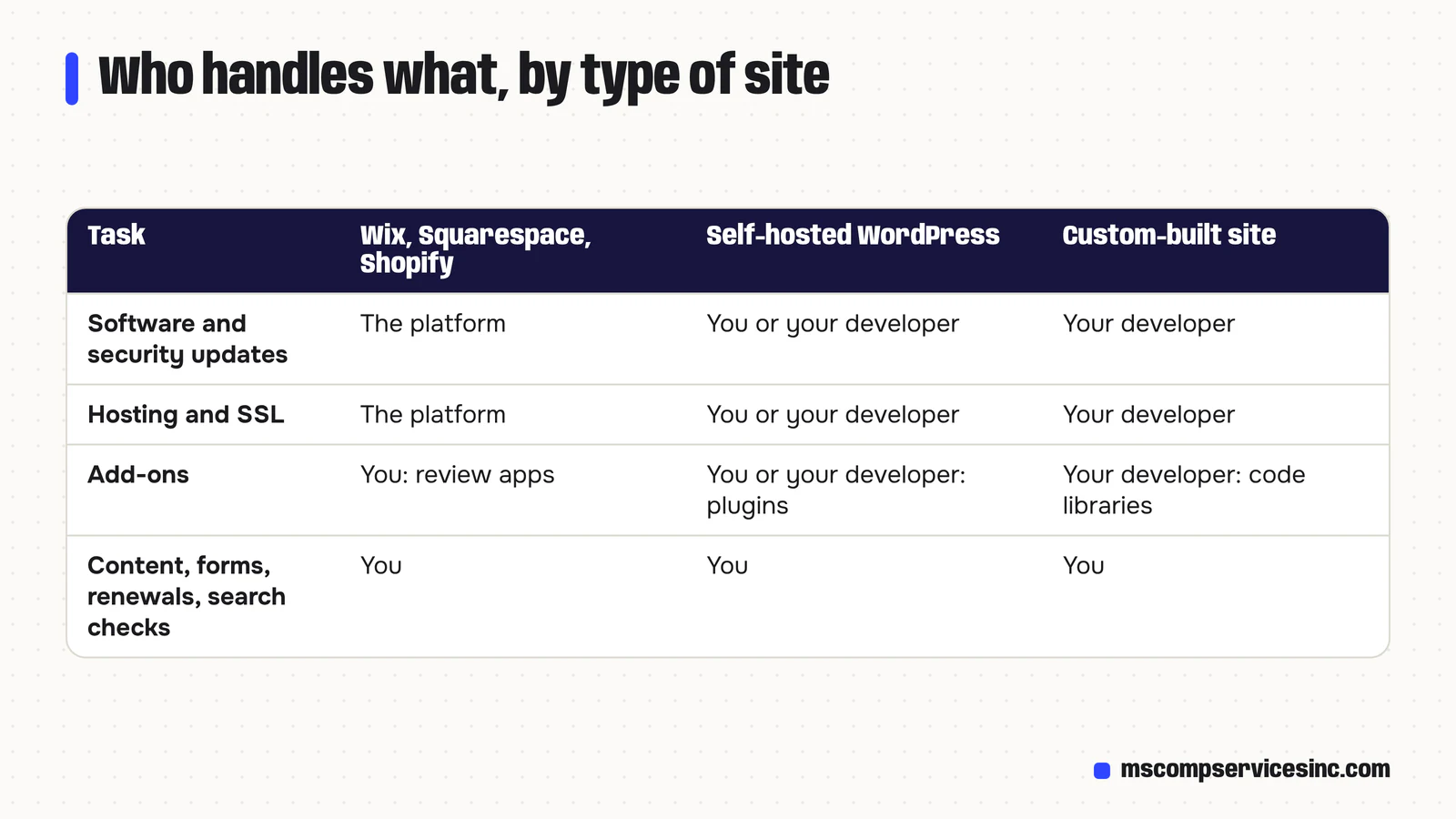
Who does what depends on how the site is built
Website builders: Wix, Squarespace and Shopify
The platform handles software updates, security patches, hosting and SSL certificates. That's a big part of why people choose them. You still own the content, the forms, any apps you've added, the domain renewal if the domain is registered elsewhere, and the search checks. Apps from a builder's marketplace are worth reviewing once in a while, because each one can add weight to every page.
Self-hosted WordPress
Everything is on you or your developer: WordPress core, the theme, every plugin, the PHP version, backups and security. WordPress installs minor security releases on its own by default, and since version 5.5 you can switch on automatic updates for each plugin. Automatic updates still need someone checking afterwards, because a plugin update can break a layout or a form. Our comparison of Wix, WordPress and Squarespace goes into this trade-off.
Custom-built sites
A site coded for your business usually has fewer moving parts than a plugin-heavy WordPress install, and no plugin marketplace to keep up with. The framework and its code libraries still need updating, and hosting still needs watching. That work needs a developer who knows the code, so ask before the build who will do it.
The accounts behind your website
Your website depends on several accounts that maintenance checklists tend to leave out: the domain registrar, the hosting company, DNS, Google Search Console, Google Analytics and your Google Business Profile. Each one should be in the business's name, with at least two people who can sign in. Write down where each account is and which email address it uses.
If the only login sits with a former employee or a web company you no longer work with, you can lose control of the domain, and with it your website and often your email. Fixing that after the fact can take weeks. Check it once a year, and whenever someone with access leaves.
What happens if you don't maintain a website?
Hacked sites are the most visible result. Attackers add spam pages, redirect visitors to other sites or hide malware, and Google may show a warning next to the site in search results, and Chrome may show visitors a full-page warning, until it's cleaned. An expired domain takes the website and any email on that domain down together, and once the grace period runs out, someone else can register it.
Most neglect is smaller: a contact form that stopped working in spring, holiday hours from two years ago, or a plugin that slows every page. None of these sends an alert, so they can cost you enquiries for months.
Can you do website maintenance yourself?
On a website builder, mostly yes. Keep the content current, test the forms each month and keep an eye on renewals. On WordPress, clicking Update is easy. The hard part is knowing what to do when an update breaks something. If your host offers a staging copy of the site, test updates there first. If it doesn't, make sure a fresh backup exists before every update.
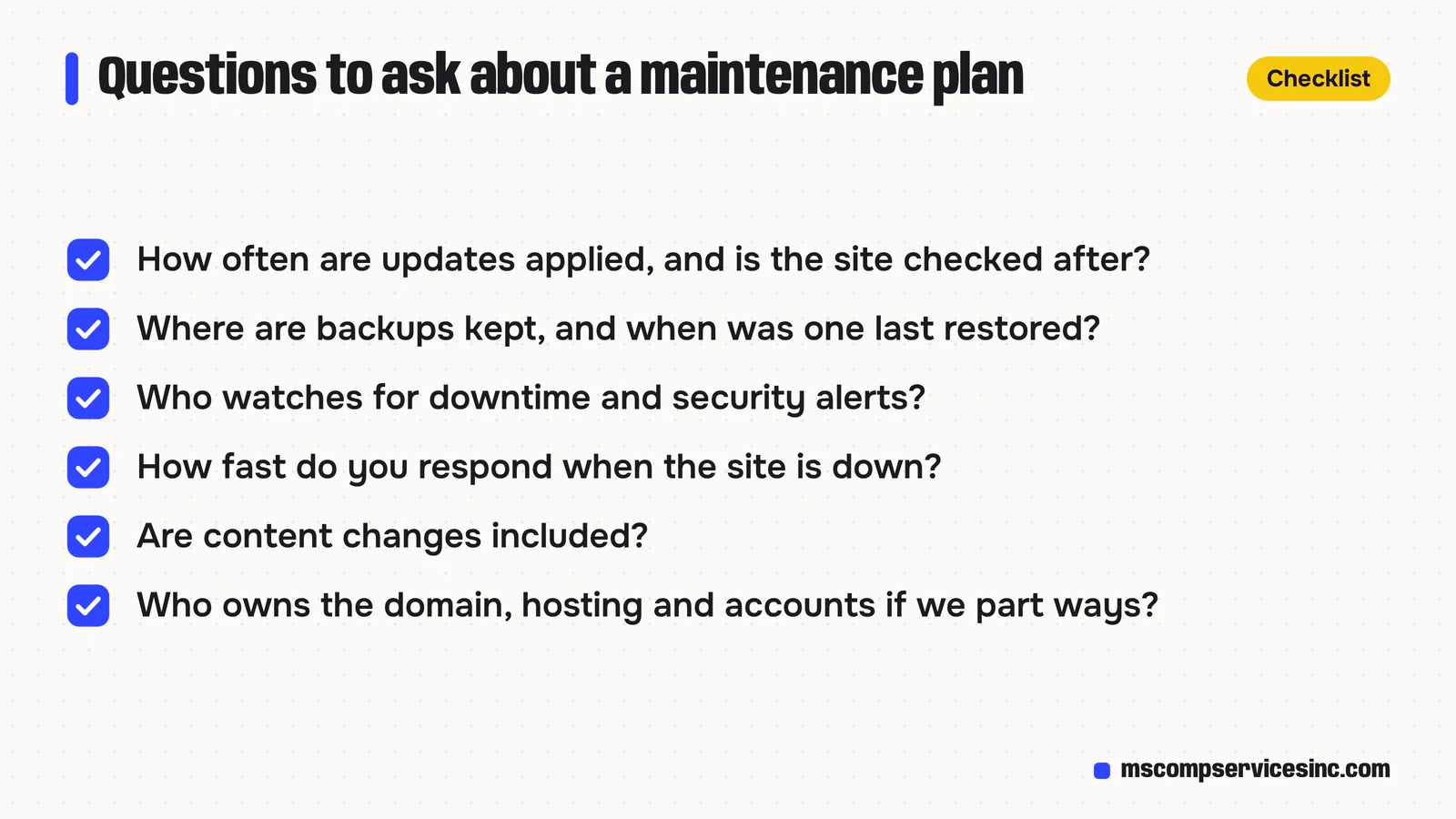
It makes sense to hand it over when the site brings in a meaningful share of your leads or sales, when it runs an online store or bookings, or when nobody on your team has time to do the checks every week. A good maintenance plan tells you in writing what it covers and how quickly someone responds when the site is down. Before you sign one, ask how often updates are applied and whether anyone checks the site afterwards, where backups are kept and when one was last restored, and who watches for downtime and security alerts. Ask whether content changes are included, and who owns the domain, hosting and accounts if you stop working together.
If you're weighing a rebuild against more maintenance, our guide to redesigning without losing SEO covers what to protect during the switch. For the sites we build, we can take on the monitoring, security updates and backups after launch. Our web design and development page explains how we work. If you'd like a list of what your current site needs, ask us for a quote.
Quick answers
What does website maintenance include?
Website maintenance includes updating the site's software, themes and plugins, running and testing backups, monitoring security and uptime, testing forms, renewing the domain and SSL certificate, checking speed and search reports, and keeping content such as hours, services and prices accurate. On a hosted builder like Wix or Squarespace, the platform covers the software and security parts.
How often should a website be maintained?
Check backups, updates and form submissions weekly. Test forms, review Google Search Console and update content monthly. Restore a test backup, review user accounts and remove unused plugins every quarter. Renew the domain, review hosting, and recheck privacy and accessibility once a year.
Is website maintenance the same as web hosting?
No. Hosting is the server space your site runs on. Maintenance is the work of keeping the site updated, backed up, secure and accurate. Some hosts include backups and software updates in their plans, but they rarely test your forms, fix broken pages or keep your content current.
Can I maintain my own WordPress website?
Yes, if you're comfortable applying updates and know what to do when one breaks something. Take a backup before every update, use a staging copy if your host offers one, remove plugins you don't use, and check the site after each update. Many owners hand it to a developer once the site runs a store or bookings.
What happens if you don't maintain a website?
Outdated software can let attackers add spam or malware, and Google may then warn visitors away. A domain that isn't renewed takes your site and email offline. Smaller problems, such as a broken contact form or out-of-date hours, cost you enquiries without any warning.
How much does website maintenance cost?
It depends on the platform, how many plugins and integrations the site uses, how often content changes and how quickly you need problems fixed. A builder site may need little beyond your own time, while a WordPress store needs regular developer hours. Ask for a written list of what each plan covers so you can compare them properly.
Want help with this?
Tell us about your business and we'll send a free quote, or call 1-800-944-3688.